Lighting console software

Run your lighting from a computer

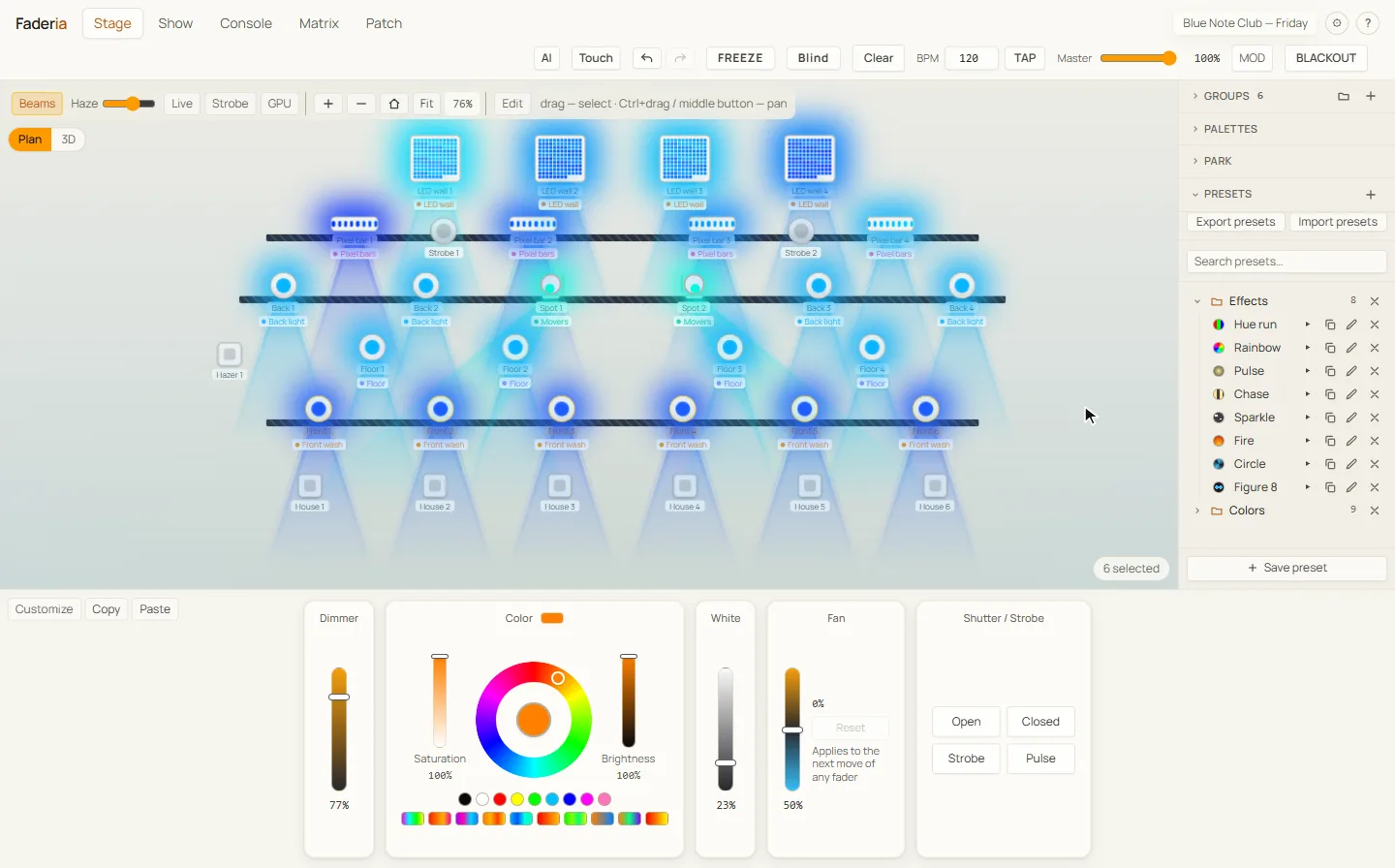
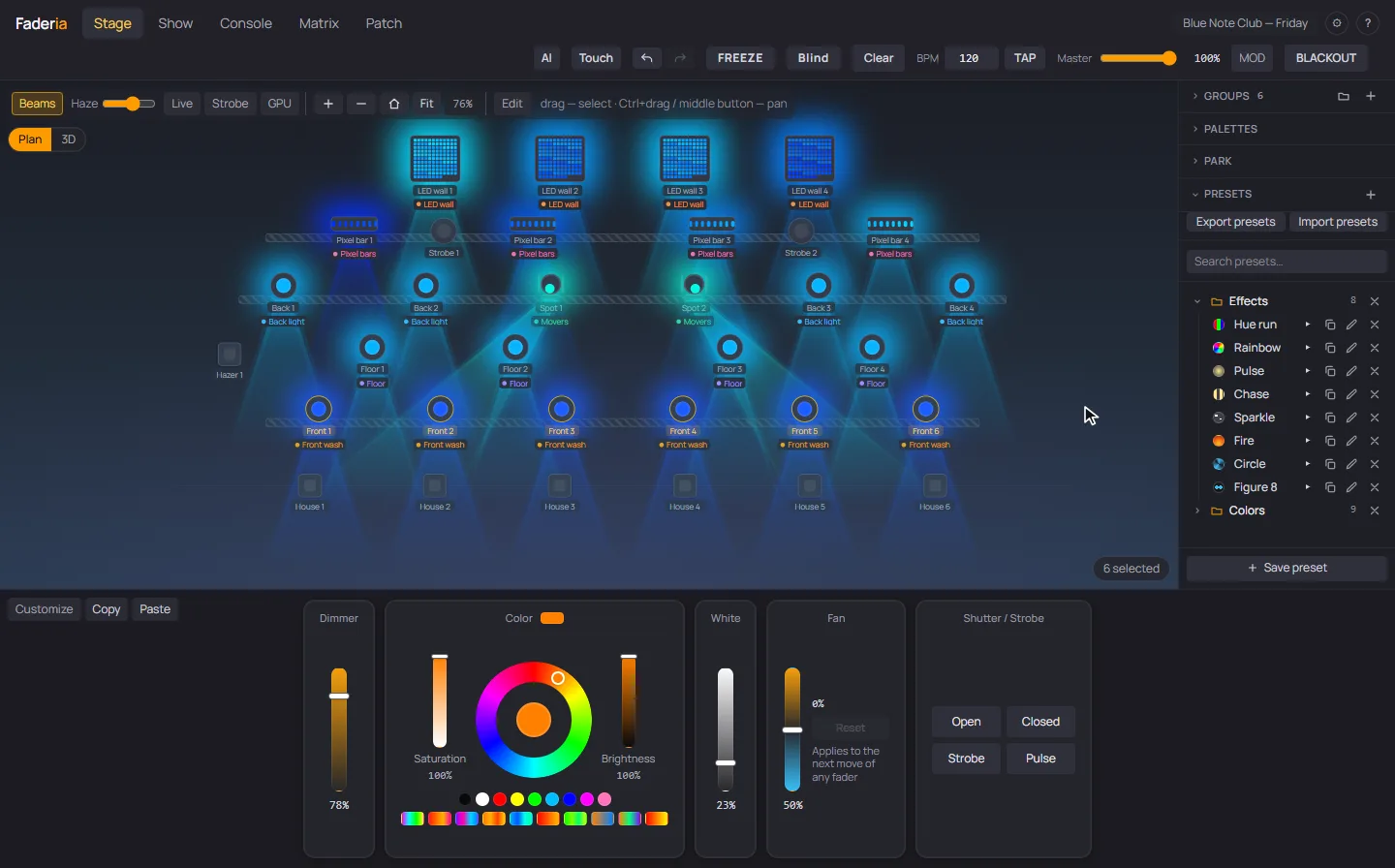
Faderia does patch, cue lists, effects, a live stage view and pixel mapping. It runs on Windows, on Linux as a beta, and a macOS version is in progress. It outputs over USB-DMX, Art-Net and sACN and does not need internet at the venue.

Download freeSee pricing

Faderia: the stage view with lit fixtures next to the cue listFaderia: the stage view with lit fixtures next to the cue list
  • Windows 10 and 11 · Linux (beta) · macOS soon
  • USB-DMX · Art-Net · sACN
  • Works offline
  • Free mode, no account needed

What you will use every show

The main screens of the console, as they look on a real show file.

Cue lists

Cue lists with fades and tracking

A cue stores only the channels that changed. When you edit one look, the cues after it stay as they were.

  • Fade, delay and follow times per cue
  • Several lists playing in parallel (Advanced)
  • GO from the keyboard, MIDI, OSC or a Stream Deck
The cue list with named cues and fade timesThe cue list with named cues and fade times

Patch

Patching the rig

Pick fixtures from the Open Fixture Library or GDTF and say how many you have. Faderia lays out the addresses, and the universe map shows which channel belongs to which fixture.

  • Hundreds of fixture profiles, plus a mode editor
  • Batch patching with automatic addresses
  • Import from other lighting software
The patch: fixture library next to the universe mapThe patch: fixture library next to the universe map

Pixel Mapper · Pro

LED walls and pixel bars

Build a matrix from pixel fixtures and run per-pixel effects, images, GIFs and video on it. You do not need a separate media server for this.

  • Per-pixel effects with colour and speed
  • Images, GIFs and video on the matrix
  • Layers mixed on top of the cue list
The Pixel Mapper running an effect on an LED matrixThe Pixel Mapper running an effect on an LED matrix

Timeline · Pro

Timeline and timecode

Place cues on a time track to fire them with the music, or follow external timecode: MTC, Art-Net Timecode, or LTC from a sound card.

  • Cues placed on a timeline
  • MTC, Art-Net Timecode and LTC
  • MIDI and OSC control from your desk
The timeline with cues placed along a trackThe timeline with cues placed along a track

Interfaces it works with

Faderia does not need a dongle or a particular brand. Here are some of the interfaces it supports.

  • Enttec DMX USB Pro
  • Enttec Open DMX USB
  • DMXking ultraDMX2 PRO
  • Art-Net nodes
  • sACN

A show night

The features you would use on a typical evening, in the order you would reach them.

  1. 16:00

    RDM

    Find fixtures on the line, change their address and personality from the console, identify them and read their sensors.

  2. 17:00

    Several outputs at once

    USB-DMX (Enttec Pro and compatibles), Art-Net and sACN can run together, with settings per universe.

  3. 18:30

    Effects

    Rainbow, wave, chase, strobe, fire, meteor and more. Effects can spread their phase across fixtures and follow the tempo.

  4. 19:45

    Operator mode for volunteers

    Useful when a volunteer runs the service or the school play. Only the run screen stays visible, and leaving this mode needs your code.

  5. 20:00

    Phone remote · Pro

    A web remote on the same network gives you GO, blackout, cues and master on a phone. You connect by scanning a QR code.

  6. 21:10

    Backup console · Advanced

    A second computer mirrors the output and the cue position. If the main computer fails, the backup takes over the output.

You keep the version you paid for

The subscription pays for new versions. If you stop paying, the console still starts.

A paid year leaves you a version

The version current at the start of a paid year becomes yours permanently. On a yearly plan that happens at purchase. On a monthly plan it happens at the renewal that crosses the anniversary.

Bug fixes are included

If version 1.4 is yours, so is 1.4.9. We maintain a version while it is current and for 12 months after the next one ships.

Works without our server

The licence is checked on your computer, so the console does not need to reach our server during a show. If our company closes, the version you own keeps working.

Pricing

Three plans. They differ in how many universes you can output and which tools are included. Prices are shown in your currency.

  • Two computers per licence
  • You keep the version you paid for
  • Cancel from your account page

Starter

For small venues, churches and schools.

…/ year

  • 2 DMX universes (1,024 channels)
  • Patch, cue lists, effects and the stage view
  • USB-DMX, Art-Net and sACN output
  • AI assistant (Claude via MCP): diagnoses the show and edits the patch, with your approval for every change
Choose Starter

Advanced

For large shows and touring.

…/ year

  • Unlimited DMX universes
  • Everything in Pro
  • Backup console with automatic takeover
  • Parallel cue lists and sound-to-light
  • AI assistant can run GO and the grand master live. The console enforces a strobe limit
Choose Advanced

Without a licence Faderia runs in free mode with 48 channels. It has the Starter features, enough to patch and program a small rig.

Card payment via Paddle. If you cancel, the plan stays active until the end of the period you paid for.

Questions

What does it run on?

Windows 10 and 11, and Linux as a beta: a .deb package for Ubuntu and Debian, and an AppImage for other distributions. A macOS version is in progress. To light real fixtures you need a USB-DMX interface or an Art-Net/sACN network node.

Which plan do I need?

Count your universes. Up to two universes with patch, cues, effects and the stage view: Starter. LED walls, timecode shows or control from a MIDI or OSC desk: Pro. Several operators, a backup console or sound-to-light: Advanced.

How does keeping a version work?

If you pay yearly, the version current at purchase is yours from the first day. If you pay monthly, it becomes yours after 12 payments in a row, and a gap of more than a week starts the count again. If you cancel before that, Faderia goes back to free mode with 48 channels when the paid period ends.

What happens if I cancel?

Your plan stays active until the end of the period you paid for. After that you keep any version you earned with a year of subscription. New versions come back if you subscribe again.

Can I buy once, without a subscription?

Yes. Buy a yearly plan and cancel it right away. The year is paid upfront, so the current version becomes yours permanently. You will not get the versions after it.

Is there a discount for schools, churches and non-profits?

Yes. Write to [email protected] from your organisation address with a link to your website or parish page, and we will send you a discount code.

Do I need internet at the venue?

No. You need a connection once, to activate the licence. After that the console works offline.